Every customer message answered.
One assistant, every messenger.
The AI Business Assistant by AI Mark replies to your customers 24/7 on WhatsApp, Telegram, Instagram Direct, Messenger and your website — using your catalog, your prices and your rules, in Georgian, Russian or English. When a deal is on the table, it hands the chat to your team mid-conversation.
"Hi! Is the Bergamo sofa in stock and how much is delivery?"
"Yes, it is in stock ($1,450). Delivery takes 3–5 days. Shall I send photos?"
Connect, teach, operate, control
No agency retainer, no six-week discovery. Most workspaces answer their first real customer within a week.
Connect
Link WhatsApp Cloud API, a Telegram bot, your Instagram and Facebook pages, or paste one script tag on your site. Credentials are stored encrypted on our servers — never in the browser.
Teach
Load your catalog, price list, FAQ, delivery and warranty policies. Set the tone, the languages, the business hours and the rules the assistant must never break.
Operate
The assistant answers every channel in one thread per customer, in the language the customer wrote in, and pushes each conversation into your CRM as it happens.
Control
Watch the shared inbox, take over any chat in one click, test changes in the playground before customers see them, and read the audit log of who changed what.
The messages that never should have reached a human
Your team keeps the conversations that close deals. The assistant takes the rest — and prepares the ones your team gets.
Product and price questions
Answers from your catalog and price list — models, materials, dimensions, stock, delivery terms.
First response, instantly
Night, weekend, holiday. The customer who wrote at 02:40 gets a real answer, not an auto-reply.
Lead qualification
Collects what your sales team actually needs: city, budget, timeline, apartment or project details.
Appointments and visits
Proposes showroom slots or a call, confirms the details and writes them into the CRM card.
Repeat-customer recognition
Matches the phone number against your CRM, greets known clients by name and keeps their history.
Routine support
Order status, warranty terms, opening hours, address and parking — the questions that eat your team’s day.
Ask it something a customer would ask
This is the real product, answering as our own assistant: ask it about plans, channels, how the handover to a human works, or what it would take to set it up for your business — in any language.
The chat opens in the corner of this page. It is our live workspace: your question reaches a real inbox, and a human can pick it up.
One screen for every conversation your business has
This is the real panel, not a mock-up — every chat from WhatsApp, Telegram, Instagram, Messenger and your website lands in one inbox, you take a conversation over with one click, and you teach the assistant by pasting your FAQ. Try it yourself in the playground before a single customer does.
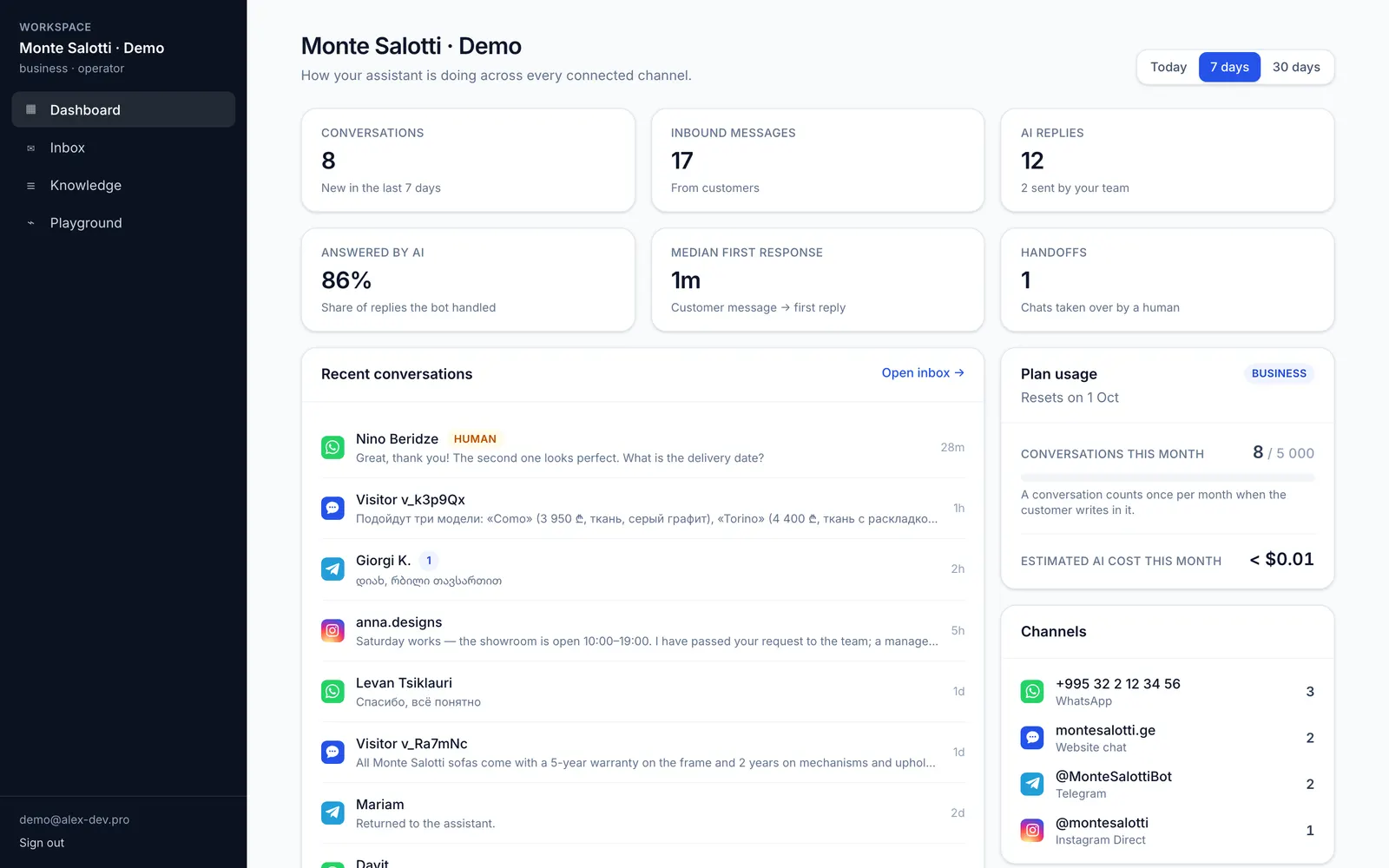
What the assistant did this week: conversations, the share it answered on its own, first-response time, and how much of your plan you have used.
No signup. A shared sandbox workspace with sample conversations — anyone can try it.
Everything your customers write to, everything your team works in
Connect a channel in the panel; the assistant, the inbox and your CRM see the same conversation.
Channels
Meta Cloud API, your own number
Your bot, live in two minutes
One script tag, any CMS
DMs from your business account
Facebook page inbox
CRM & systems
Open Lines connector — chats land in your Bitrix inbox
Leads and conversation notes
Leads and conversation notes
Contacts, deals and timeline events
Push every event into your own systems
Booking slots straight from the chat
The assistant knows when to step aside
Automation that cannot get out of the way costs you deals. This one hands over on a keyword, on a media message it should not interpret, on a manager’s click — and hands back when the conversation goes quiet.
- Customer asks for a human
Any handoff keyword you configure — in any of your languages — stops the assistant instantly and notifies the team.
- Your manager takes over
One click in the shared inbox, or simply reply from Bitrix24 Open Lines. The assistant goes silent for that conversation.
- Everything stays in one thread
Bot replies, manager replies and customer messages sit in the same history — in the panel and in your CRM.
- Automatic return to the bot
After the idle period you set (default 24 h), the assistant resumes so no one has to remember to switch it back on.
- Outside business hours
The assistant says when a human will reply instead of promising an answer nobody will send.
Your customers’ data is not our training set
The boring guarantees, stated plainly. Ask for any of them in writing before you sign.
One workspace, one dataset
Every conversation, knowledge entry and credential is scoped to your workspace and filtered by workspace id on every query. No shared pool of customer data.
Credentials stay server-side
WhatsApp tokens, bot tokens and CRM keys are encrypted at rest and used only by our servers. The panel shows masked hints, never the secret.
Audit log
Who changed the prompt, who connected a channel, who took a chat over, and when. Exportable on request.
PII-minimised prompts
The model receives the conversation and your knowledge base — not your CRM database. Customer records are matched server-side.
EU / US model providers
Anthropic, OpenAI or DeepSeek — your choice per workspace, or bring your own key on Enterprise.
Deletion on request
Delete a conversation, a knowledge entry or the whole workspace. We remove it from the live database and from backups on the next cycle.
Built for businesses that sell through chat
Anywhere the first question arrives in a messenger and the answer decides whether there is a second one.
Catalog questions, materials, lead times, showroom visits.
Procedure prices, preparation rules, booking requests.
Listing details, viewings, budget and district qualification.
Availability, service slots, parts and warranty questions.
Stock, sizes, order status, returns and delivery.
Scope, rates, availability, intake questions before the first call.
From $149 a month
Flat monthly price per workspace, not per seat and not per message. Annual billing takes 20% off. No agency retainer.
We connect the channels, load your knowledge and tune the tone — you approve the result.
- Channel connection: Meta Business / WhatsApp Cloud API, Telegram bot, website snippet
- Knowledge base import from your catalog, price list, FAQ and policies
- Tone and rule tuning in your languages (ka / ru / en and others)
Typically live in 3–5 working days.
Questions we get before every contract
Do I need Meta Business verification?+
For WhatsApp, Instagram Direct and Messenger — yes. Meta requires a verified Business Account before a business number or page can send messages through the API. We walk you through it step by step and hand you the exact click path; the verification itself is done in your own Meta account, because the number and the pages must stay yours. Telegram and website chat need no verification at all and can be live the same day.
Which AI models do you use?+
The assistant is provider-agnostic. By default we run Anthropic Claude for quality-sensitive workspaces and can switch to OpenAI or DeepSeek per workspace — the model is a setting, not a rewrite. On Enterprise you can supply your own provider key and pick the region it runs in.
What happens to my data?+
Conversations, knowledge entries and channel credentials live in your workspace and are never mixed with another client’s. Credentials are encrypted at rest. Model providers receive the conversation and the relevant knowledge snippets only, under their no-training-on-API-data terms. You can export or delete everything on request.
Which languages does it speak?+
It replies in the language the customer wrote in — Georgian, Russian and English are the ones we tune and test for the region, and the underlying models handle most European languages. You can also pin the assistant to a fixed set of languages in the settings.
Can my team take a conversation over?+
Yes, in one click — from the shared inbox, from Bitrix24 Open Lines, or automatically when the customer asks for a human or sends something the assistant should not answer. The assistant stops immediately, your manager writes as themselves, and the chat returns to the assistant after an idle period you choose.
Stop losing the customers who wrote at midnight.
Start a workspace in a few minutes, or let us set the whole thing up for you.